Understanding the Komier Financial Pulse Dashboard — Your Entire Business at a Glance
The dashboard is the first thing you see every time you open Komier. It is not decorative — it is the most important page in your account. Everything you do in Komier, every quote you create, every invoice and receipt you generate, every expense you log, every payslip you process, feeds into this single screen and updates it in real time.
If you use Komier well, opening your dashboard at any moment should tell you the full financial story of your business right now — not last week, not last month. Now. This guide explains every element of the Financial Pulse dashboard and how to read it.
The Five Key Metric Cards
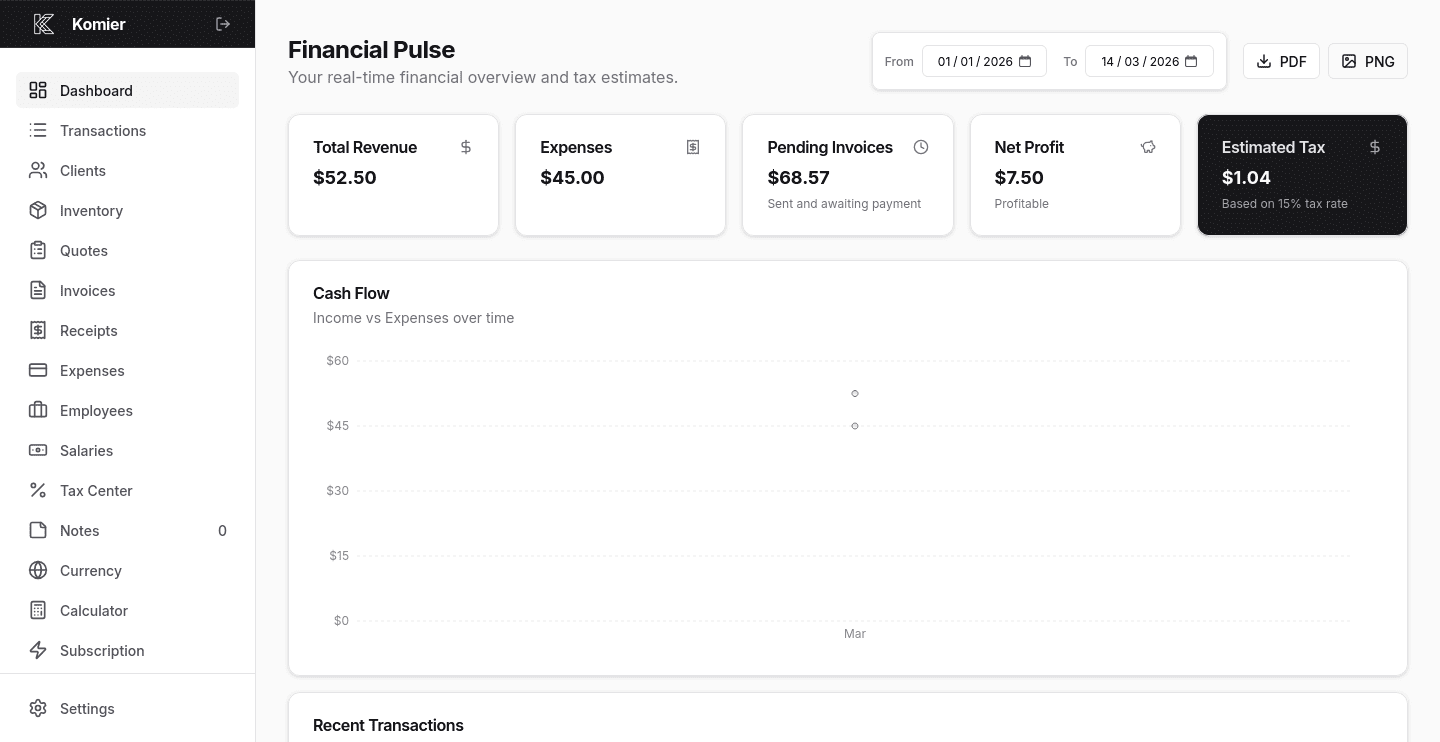
Total Revenue
This is the sum of all income recorded in your Komier account for the selected period — every invoice marked as paid, every receipt logged as income. It represents money that has actually arrived in your business, not money you have invoiced but not yet received.
Watch this number across periods to understand your income trajectory. Is it growing month over month? Seasonal dips? A sudden drop in revenue is a signal worth investigating before it becomes a cash flow problem.
Expenses
The total of all costs logged in your account for the selected period — expenses, receipts you have logged as outgoings, and payslips processed through the Salaries module. Everything your business spent, in one figure.
The relationship between your Expenses and Revenue figures is the most important ratio on your dashboard. If expenses are growing faster than revenue, that gap will eventually become unsustainable. Komier makes this visible at a glance so you can act before it becomes critical.
Pending Invoices
Invoices sent to your clients that are awaiting payment. This is money that your clients owe you for work that you have already delivered.
Komier reminds you to notify your past clients about that overdue payment, awaiting to be converted into revenue.
Net Profit
Revenue minus Expenses. The single most important number for understanding whether your business is financially healthy in any given period. A positive net profit means you are keeping more than you spend. A negative net profit — shown as a loss — means your costs are exceeding your income.
Komier updates this figure in real time. Every new transaction — paid invoice, logged expense, processed salary — adjusts your net profit immediately. You never have to calculate it manually or wait for a monthly report.
Estimated Tax
Based on your net profit and the Default Tax Rate you have configured in Settings, Komier calculates an estimated tax liability in real time. This is the dark card in the top right corner of your dashboard — deliberately set apart visually because it is a figure that deserves constant attention, not a year-end surprise.
The estimate updates every time your net profit changes. If your profit goes up, your estimated tax goes up. If you log a significant expense and your profit drops, your tax estimate adjusts downward. It is always live, always current.
If your expenses exceed your revenue in the selected period, your Net Profit will show a negative figure and your Estimated Tax will show zero — because you do not owe tax on a loss. This is not a bug, it is correct financial logic. It is, however, a signal to review your expense structure urgently.
The Dashboard on Mobile
Komier is fully responsive. Your Financial Pulse dashboard looks and works exactly as designed on a phone or tablet as it does on a desktop. The five metric cards stack vertically on mobile, the cash flow chart scales to your screen, and the recent transactions panel remains fully readable.
For entrepreneurs who manage their business on the go, this means your full financial picture is available anywhere — not just at your desk.